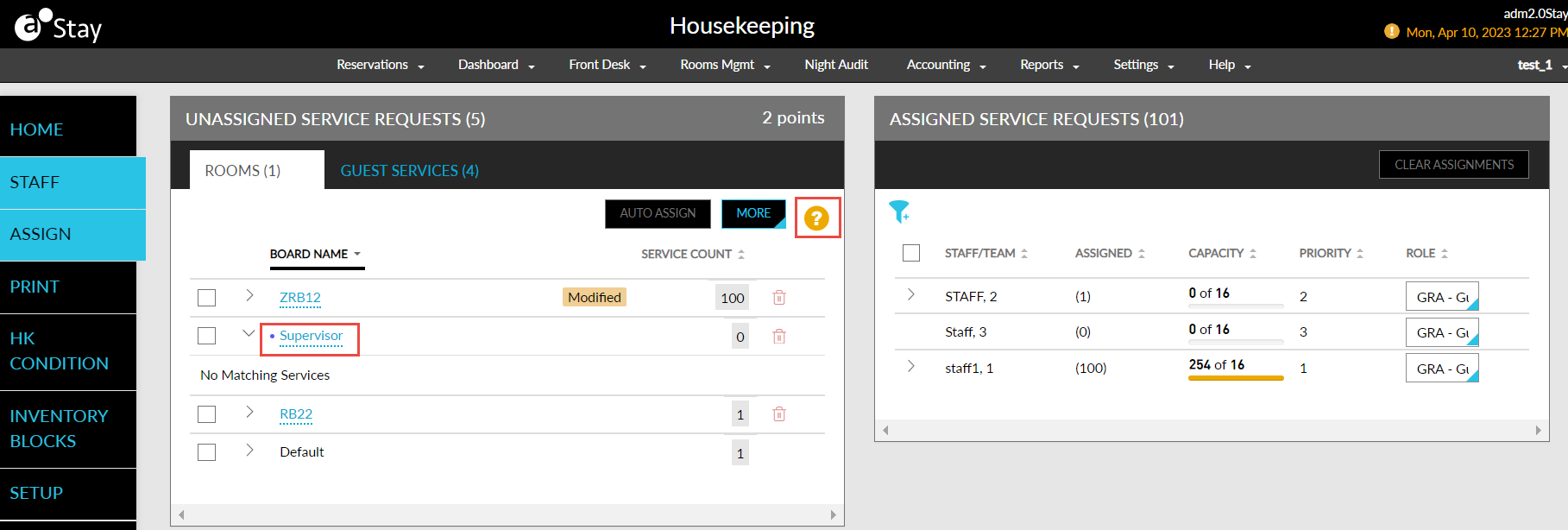
Create Instant Housekeeping Boards
Stay is enhanced to provide users the ability to create instant housekeeping boards for the day. The instant boards are ad hoc boards that are created when the housekeeping staff plan their work for the day. These boards are created in addition to the recurring boards created during date roll. The instant boards are valid only for the day of creation and are not recreated after date roll.
The functionality of the instant boards are similar to the recurring boards. Users can modify or remove a created instant board. The created instant boards are also displayed in the Print tab of the Housekeeping screen for printing the staff assignment sheet.
Feature Setting
The following new feature setting is introduced to allow users to enable or disable the boards at the property level:
-
Name: Housekeeping Boards
-
Value: Must be enabled
-
Comments: License is not required
Permissions
The following new permission is introduced to enable users to create custom boards for the day:
-
Stay_CreateCustomBoards
This permission is added by default to the following system defined roles:
-
System Administrator
-
Stay Hotel Manager
-
Department Manager
-
Stay Hotel Supervisor
-
Stay Housekeeping Supervisor
-
HK Supervisor
The following changes have been made to support the creation of instant boards:
-
A new tab, Instant Boards, is added to the Housekeeping Boards section of the Housekeeping Setup screen, that displays the new checkbox, Allow Creation of Instant Boards.
-
When the Allow Creation of Instant Boards checkbox is enabled, users can create instant boards in the Unassigned Service Requests section in the Assign tab of the Housekeeping screen.
-
-
A new option, Create Instant Board, is added to the More button in the Unassigned Service Requests section. When clicked, the Create Board screen appears.
-
A help icon is added to the Unassigned Service Requests section, that displays the label for the instant boards.
Create Board Screen
The Create Board screen displays the following fields:
|
|
|---|---|
|
|
|
|
|
|
|
|
|
|
The created instant boards are indicated using a dot (.) indicator.